How I built my own design tool, reCanvas, in ten days
 · 6 min read
At REDZI Digital we drew our designs in Paper. A good tool, but with two problems that grew every month.
The first is price. One design seat at $20 a month is nothing. Two are fine too. For seven people it is already $112–140 a month, and the bill grows with every new colleague.
The second is client feedback. It came by email, WhatsApp and screenshots. Someone retyped it into tasks, then someone else looked for it in the design and fixed it. Every round of feedback took about an hour, and much of that was retyping.
On 15 November I decided: we will build our own.
What I wanted
I wrote the requirements in one paragraph, and they have not changed:
- Design as HTML. So Claude Code and other AI agents understand it like code and can drive it through MCP.
- One place on a server. All files, comments and teams on our own Docker server, not in someone else’s cloud.
- Teams and permissions. Private projects others cannot see, and access to each file separately.
- A link for the client. The client opens a link, pins a comment on a specific element without an account, and the agent reads it and fixes it.
- Working together. Several people in one file at the same time.
- For other companies too. Each can get its own space and use it with its own AI agent.
The first two days
The first version was made on the afternoon of 15 November, and the same day it was running on our server. A Rust server, a web editor, a Mac app, sign-in with email and password, automatic deploys from GitLab, and 29 MCP tools that we tested both locally and in production.
On 16 November the project had a name, reCanvas, a logo and the domain recanvas.design. The same day we moved all our Paper designs over: 45 files, 2,211 artboards and about 319 thousand elements, with the real images and SVGs. Since then REDZI designs live in reCanvas, and we no longer need Paper.
That same day we also started the iPhone app with Expo: files, comments, and what Claude is doing right now.
The client comments, the agent fixes it
The main idea is that feedback no longer has to be retyped. The client gets a link, opens it on a phone or a computer and pins a comment right on a button or a heading. No account, nothing to install.
Then my AI agent, for example Claude Code, reads the comment through MCP, changes the design, replies to the client and marks the comment as resolved.
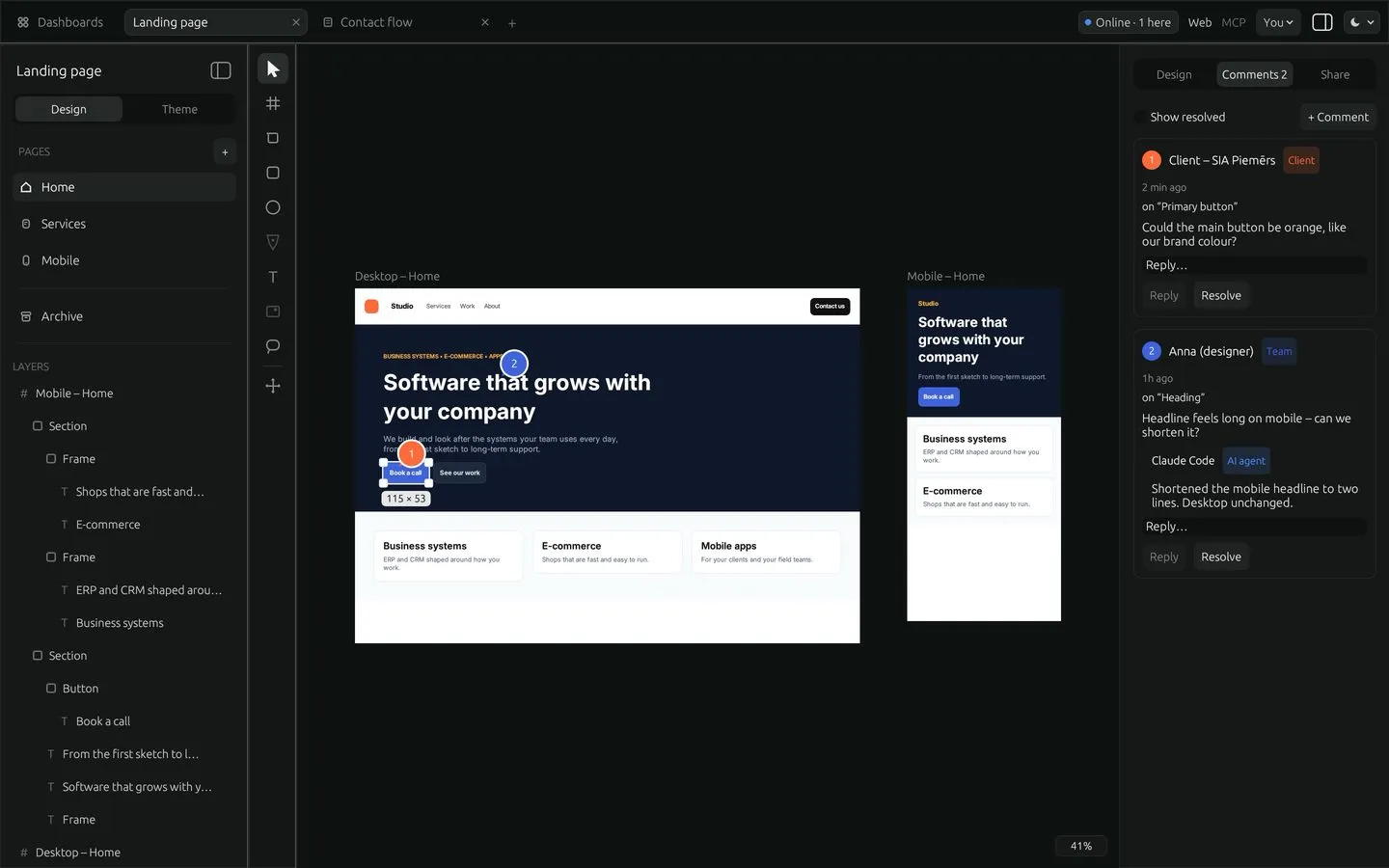
The comments panel. The client writes on the element, and the agent replies right there. The project in the picture is a demo
It mattered that this is not a black box. When the agent works, blue outlines in the editor show which layers it is changing right now. Follow moves your view with the agent, and the activity log shows every step. The iPhone app shows the same.
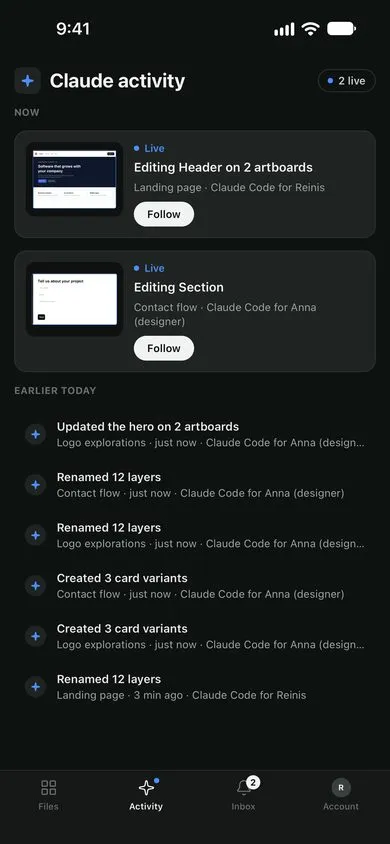
Claude activity in the iPhone app
From an internal tool to a product
In the first week reCanvas was our own tool. In the second it became a product you can buy:
- Plans. Free (1 editor, 3 files), Pro €12 per editor, Studio €49 a month for up to 10 editors, Agency €99 for up to 25. Clients who only comment are always free, and MCP use is never metered.
- A 14-day trial of Studio, no card.
- Stripe subscriptions, VAT and invoices, and a superadmin panel with revenue and a forecast.
- A Mac app for the App Store and an iPhone app.
- Theme tokens, components and variants, a Pen tool for vectors, any Google Fonts family or the team’s own font.
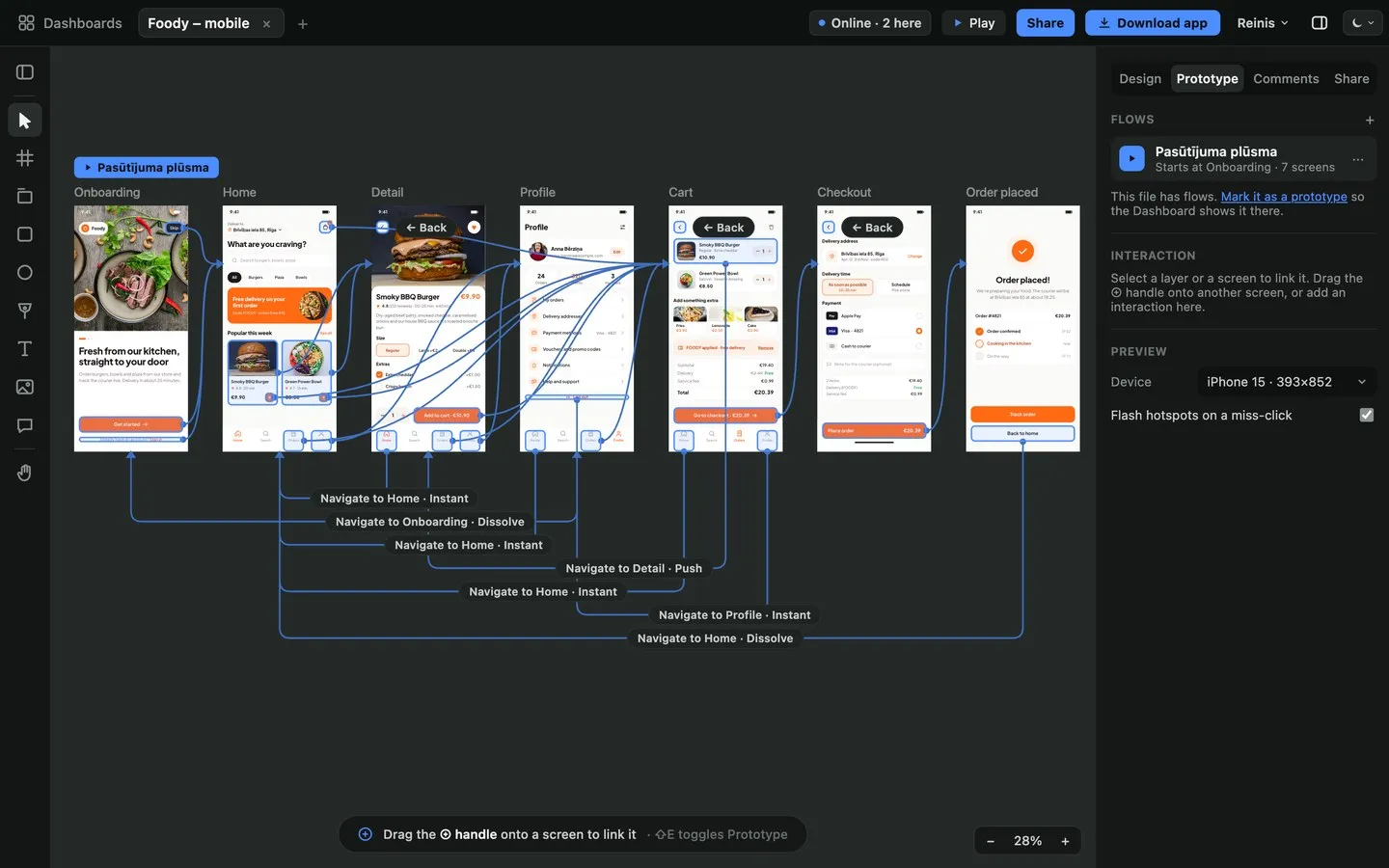
This week prototypes arrived. You link screens, pick an animation and press Play. The client opens the prototype from a link or a QR code on their phone and taps through it like a real app. The agent can create the links through MCP too; there are now more than 40 such tools.
Prototype mode. The arrows show which element leads to which screen
What it took
In ten working days the server and editor got 292 commits, and the iPhone app another 28. Two of us worked on it, my colleague Ralfs and I, and Claude Code wrote most of the code. My part was the same as in other projects like this:
- what we build and what we don’t. A specification and a plan for every larger piece, then the code;
- checking. Tests, security reviews, real use on our own client designs;
- infrastructure. The server, backups, GitLab CI, Stripe, the App Store.
Not everything is finished. The data still lives in one file on the server, which is enough for our team and the first customers, but with many teams it will have to change. Working together works, but simply. That is a deliberate choice: use it ourselves first, then improve what actually gets in the way.
What I take from it
A couple of years ago, building your own design tool would have been a silly idea for a small agency. Now it is a project of a couple of weeks, if you know what you want and someone checks the work.
But the biggest value is not the subscription money saved. It is that the tool is built around how we work now: the client comments, the AI agent fixes, a person checks. In off-the-shelf tools AI was added later. Here it is there from day one.
If you want to try it, reCanvas is at recanvas.design, and the free plan has no time limit. If you have a similar situation with some other tool that charges per person and does not do what you need, write to me.